Anonymous Google Reviews
Can you leave an anonymous Google review? Not truly. Every Google review is tied to a Google Account behind the scenes, so a literal anonymous Google review does not exist....
Can you leave an anonymous Google review? Not truly. Every Google review is tied to a Google Account behind the scenes, so a literal anonymous Google review does not exist. Since November 2025, though, Google Maps lets you post under a nickname and an alternate picture instead of your real name and photo. Strangers and business owners see the alias; Google still knows which account wrote the review. This guide explains how to leave an anonymous-looking Google review the supported way, what stays identifiable, and how business owners should respond.
Contents
- Can you leave an anonymous review on Google?
- What the public sees and what Google still knows
- How to leave an anonymous Google review with a custom name
- Comparing Google review identity types
- Why a second account is not a clean workaround
- How your review text can give you away
- Rules every review must follow, with or without a nickname
- Common mistakes and debunked advice
- How business owners should handle pseudonymous reviews
- Frequently asked questions
- Sources
Can you leave an anonymous review on Google?
If “anonymous” means posting with no Google Account attached, the answer is no. Google’s help page for Maps ratings and reviews states that reviews are public and that you cannot add an anonymous review. Earlier, legacy reviews appeared under generic labels such as “A Google User,” but that is not how new reviews are published today.
What changed is the display layer. Google announced in November 2025 that Maps users can post reviews with a custom name and picture, rolling out gradually across Android, iOS and desktop. In practice, that gives you two privacy outcomes:
- Publicly: your review shows a nickname and picture you chose, not your Google Account name and photo.
- Behind the scenes: the review stays associated with your Google Account, and Google’s protections against suspicious and fake reviews remain in place.
So the most accurate description is a pseudonymous review: unlinked to your real name in public view, but not invisible to Google. If you need protection from Google itself, a review is the wrong tool.
What the public sees and what Google still knows
| Audience | What they can see | What they cannot see (from the profile alone) |
|---|---|---|
| Other users and the business owner | Your chosen nickname, alternate picture, star rating, review text, any photos you add | Your Google Account name and real profile picture, when the custom name option is on |
| The account that wrote the review and the signals it uses to detect abuse | Nothing relevant: the account link remains internal | |
| A court or legal process | Depends on the law and the request; Google may be required to respond to valid legal demands | Not guaranteed to stay private in a legal dispute |
Treat the nickname as a privacy preference for casual public exposure (for example, not wanting a local business owner to see your full name), not as protection against investigation. Do not rely on it for anything where your safety or a legal outcome depends on staying unidentified.
How to leave an anonymous Google review with a custom name
The option is rolling out gradually, so you may not see it yet on every account. If you cannot find it, check that the Google Maps app is up to date and try again later. The steps below follow Google’s announcement as reported at launch; menu names can change, so follow the labels on your screen.
- Open Google Maps on Android, iOS or desktop and sign in to the Google Account you normally use.
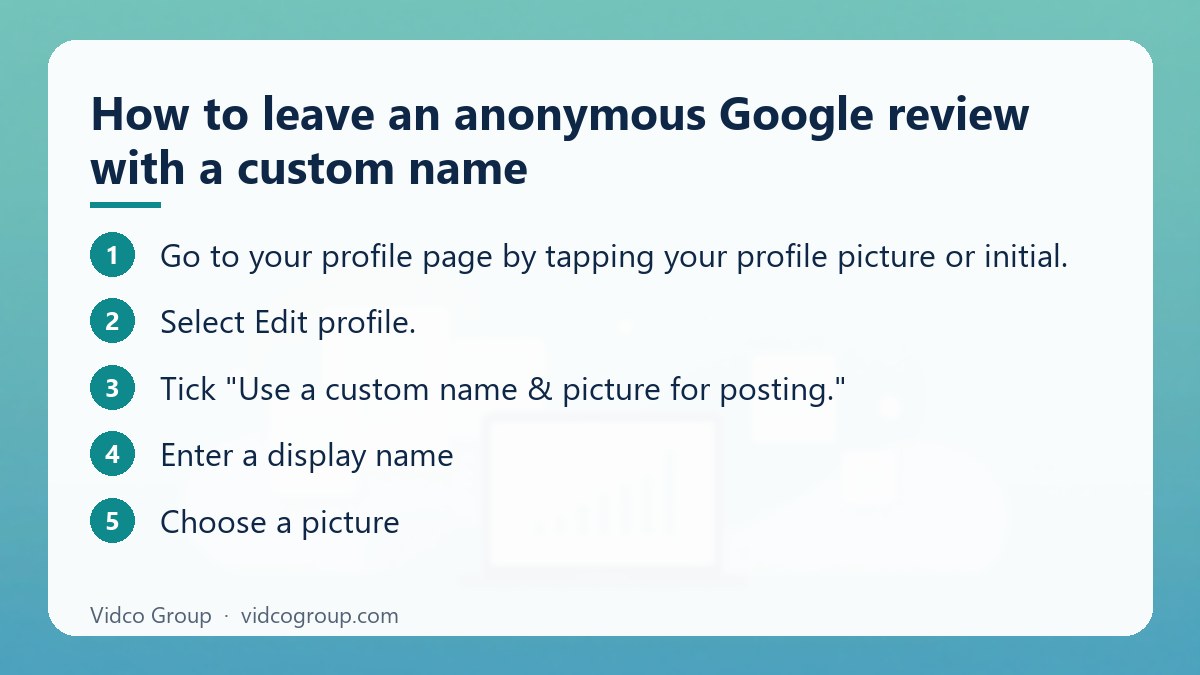
- Go to your profile page by tapping your profile picture or initial.
- Select Edit profile.
- Tick “Use a custom name & picture for posting.”
- Enter a display name. A nickname, initials or a generic handle all work. Avoid using someone else’s name or a name meant to mislead.
- Choose a picture. Upload one, or pick from Google’s illustration library. It does not need to be a photo of you.
- Save, then find the business in Google Maps, tap the review option, choose your rating and write your review.
To go back to your Google Account name and photo, return to the same screen and untick the box.
Check before you post
- Open the business page, or ask a friend to, and confirm the review shows your nickname rather than your real name.
- Reports differ on whether switching the option changes how past reviews display. After turning it on or off, review your existing reviews on your profile so you know what name each one shows.
- The setting applies to your profile for posting, not to one review at a time. If you want some reviews under your real name and others under a nickname, you cannot do that from one account.
Comparing Google review identity types
| Identity type | What others see | What Google knows | Notes |
|---|---|---|---|
| Legacy “A Google User” label | Generic label, no name | Older reviews may still show it | Not an option for new reviews |
| Custom name and picture (Maps) | Your nickname and alternate picture | The review is linked to your Google Account | Supported option since the November 2025 rollout; availability is gradual |
| Standard personal profile | Your account name and profile picture | Linked to your account and activity | Default; also what the business owner sees by default |
| Separate account under another name | Whatever name that account uses | Linked to that account | Allowed only when not used to mislead; see the next section |
Why a second account is not a clean workaround
Many older guides tell readers to create a second Google Account in a made-up name to review privately, then “warm it up” with searches so reviews are not filtered. We do not recommend that approach, for three reasons:
- Google’s content policy allows alternative names only when the content is not trying to mislead. Using extra accounts to post several reviews of the same place, to inflate or damage a rating, or to hide a conflict of interest is manipulation, not privacy.
- Warming up an account to avoid spam filters is an attempt to evade detection. Google blocks or removes large volumes of policy-violating reviews every year, so trying to look more “natural” to the filter is both unreliable and against the spirit of the rules.
- There is now a supported option. If your goal is simply not to show your full name to a business owner, the custom name feature does that without a second identity.
A genuine second account used for a different purpose, such as a separate work or family account, is a normal Google use. The problem is only when it is used to deceive.
How your review text can give you away
The nickname hides your profile, not your story. A business owner can often identify a customer from the details in the text. If you want to stay unidentified to them, avoid:
- Exact dates and times of your visit or appointment.
- The names of staff you dealt with, or a precise description of who served you.
- Order, booking or invoice numbers, and the exact items or services bought.
- Details about your job, address, vehicle, children or other personal information.
- Photos with metadata or identifiable background, receipts or personal documents.
Write what happened and how it affected you in general terms. Honest, specific feedback about the experience is more useful to readers than identifying detail, and Google’s policies also restrict sharing personal information about others without consent.
Rules every review must follow, with or without a nickname
A nickname does not change Google’s contributed content policy. The categories most relevant to reviews are summarized below:
| Policy area | What it means for a reviewer |
|---|---|
| Fake engagement | Review only real experiences at that location; paid or fake reviews are prohibited |
| Conflict of interest | Do not review your own business, a competitor or an employer to help or hurt them |
| Incentivized content | Do not post reviews in exchange for payment, discounts or free items |
| Impersonation | Do not pose as another person or organization |
| Harassment and offensive content | No threats, hate speech or unsubstantiated criminal accusations |
| Personal information | Do not share identifiable details about others without consent |
| Off-topic content | Keep the review about your experience at the place |
The policy states that alternative names for a person or organization are acceptable where the content is not attempting to mislead others. That is the legal basis for pseudonymous reviews: a nickname is fine, deception is not.
Common mistakes and debunked advice
“Just change your Google Account name”
Older guides suggest renaming your whole Google Account. That changes your name everywhere it appears, including in email and Google Docs, and it is no longer needed for reviews now that Maps has a separate custom name option.
“Use a VPN to hide your identity”
A VPN does not unlink a review from your Google Account, because you are signed in. Google also does not publish which signals trigger review filtering, so claims about exact success rates for VPNs, new accounts or locations are guesses. Post from your normal connection and focus on writing an honest review.
“A new account is enough to be untraceable”
It is not. The account still exists, and activity associated with it can still be reviewed by Google.
“Anonymous reviews do not count”
Reviews posted under a nickname count the same as any other review for ratings and local results, as long as they pass Google’s checks and follow the policies.
Statistics you may have seen
Some blog posts quote precise percentages for review filtering, shadow-banning or account age thresholds. Google does not publish such figures, and we could not verify them, so this guide does not repeat them. One figure that is documented: Google reported blocking or removing more than 240 million policy-violating reviews in 2024, most before anyone saw them.
How business owners should handle pseudonymous reviews
If you run a business, a review from a name you do not recognize is not automatically fake, and with the custom name option more genuine customers will appear under nicknames. Use a calm process.
1. Cross-reference your own records
Match details in the review text (dates, services, quotes, staff names) against your CRM, booking system, point-of-sale timestamps or support tickets. Specific details often show whether there was a real transaction, without needing the reviewer’s real name.
2. Post a professional public response
A measured reply shows prospective customers how you handle problems. Respond promptly, stay factual, and invite the reviewer to contact you privately. Do not accuse them of being fake or reveal any customer’s personal information in public.
Example: “Thank you for the feedback. We take this seriously and would like to look into it. Please contact our team at [email or phone] so we can understand what happened and put it right.”
3. Flag only genuine policy violations
A nickname alone is not a violation. If the review contains spam, off-topic content, profanity, harassment, an apparent conflict of interest or content that is clearly not about a real experience, report it from your Business Profile: open the reviews, use the report option next to the review, choose the reason and send. Google says the evaluation typically takes several days, and if the first decision goes against you, you can pursue an appeal. Include any evidence that supports your case.
| Situation | Recommended action |
|---|---|
| Negative review, name unfamiliar, no policy violation | Check records, reply politely, invite private contact |
| Review about a service you do not offer or a different location | Reply briefly, then report as off-topic or not based on a real experience |
| Multiple similar 1-star reviews in a short time | Document dates and content, report them, and keep records for any appeal |
| Review contains threats, hate speech or personal data | Report immediately under the relevant policy |
| Suspected competitor attack | Report with evidence; do not retaliate or post fake reviews yourself |
| Offered “guaranteed removal” for a fee | Decline: no vendor controls Google’s decisions, and mass-flagging tactics risk your listing |
Google also notes that it does not get involved in conflicts between businesses and customers, so the best long-term defense is a steady flow of genuine reviews from real customers and a visible record of professional replies.
Frequently asked questions
Can you leave an anonymous Google review?
Not fully. Reviews are always linked to a Google Account internally. You can, however, turn on a custom name and picture in Google Maps so the public sees a nickname instead of your real name.
How do I leave an anonymous Google review?
In Google Maps, open your profile, choose Edit profile, tick “Use a custom name & picture for posting,” set a name and picture, save, then write your review as usual. The option is rolling out gradually, so you may need to update the app or wait.
Can a business owner see who left a Google review?
They see the public name and picture on the review. With the custom name option on, that is your nickname. They cannot see your account details from the review itself, but they may recognize you from the details you describe.
Is a Google review with a fake name against the rules?
Alternative names are allowed when they are not meant to mislead. What is not allowed is impersonation, fake reviews, conflicts of interest or manipulating ratings, with or without a nickname.
Does a nickname review count toward the star rating?
Yes, a published review counts the same as others, provided it follows Google’s policies and passes its checks.
Can a business remove an anonymous review?
Only if it violates Google’s policies. A nickname alone is not a violation. Owners can report a review from the Business Profile, and the evaluation usually takes several days.
Will my past reviews change when I turn on the custom name?
Reports vary, and Google’s launch announcement as reported did not clearly say. After changing the setting, open your profile and check how each past review appears.
Can Google identify me if I post under a nickname?
Yes, internally. The review remains associated with your Google Account. A nickname limits what the public sees; it does not make you anonymous to Google or exempt you from legal process.
Conclusion and next step
An anonymous Google review in the strict sense is not possible, but a pseudonymous one is: use Google Maps’ custom name and picture, keep identifying details out of the text, and follow the content policy. For business owners, the right response to a nickname review is evidence, a polite public reply and a policy-based report only when warranted.
How Vidco Group can help: if you manage a brand’s reputation and want to understand how reviews and search visibility fit together, including how your business is represented in AI-generated answers, the Vidco Group team can run an AI search optimization baseline. See our pricing, read about realistic SEO client expectations, or contact us.
Sources
- Google Maps Help: Rate places and write reviews
- Google Maps user-generated content policy
- Google Business Profile Help: Report and manage reviews
- Google Blog: How Google Maps uses AI to protect Business Profiles (April 2025)
- 9to5Google: Google Maps adds review nicknames (November 2025)
Updated: October 2026
Need an SEO, AEO or GEO strategy?
The Vidco Group team is ready to work with you