Common URL Problems That Quietly Cost You Traffic
The most common URL problems in SEO are tracking and filter parameters that duplicate pages, uppercase and trailing-slash variants that resolve separately, session IDs in crawlable links, faceted navigation that...

The most common URL problems in SEO are tracking and filter parameters that duplicate pages, uppercase and trailing-slash variants that resolve separately, session IDs in crawlable links, faceted navigation that generates endless combinations, inconsistent non-ASCII encoding, HTTP/HTTPS and www variants, redirect chains, and needlessly deep paths. They rarely cause a visible crash. They split authority across near-duplicate pages, waste crawl capacity, and make analytics disagree with what search engines index. The fix is usually the same pattern: choose one preferred URL, redirect or canonicalise the rest, and update every internal signal to match.
Contents
- Why URL problems quietly cost traffic
- How to diagnose URL problems before changing anything
- URL problem diagnostic table
- 1. Parameters creating duplicate URLs
- 2. Uppercase and trailing-slash inconsistency
- 3. HTTP, HTTPS, www and homepage variants
- 4. Session IDs in crawlable URLs
- 5. Infinite faceted URLs
- 6. Non-ASCII encoding inconsistencies
- 7. Underscores, fragments and unreadable URLs
- 8. URLs with unnecessarily deep paths
- 9. Redirect chains and wrong redirect types
- Choosing the right fix: redirect, canonical, noindex or robots.txt
- Implementation and monitoring checklist
- Frequently asked questions
- Sources
Why URL problems quietly cost traffic
Crawlers treat a URL as an identifier. If two addresses return the same content, a search engine has to decide which one to index, which one receives the link signals, and which one to show. Google documents several ways to state that preference, ranked by strength: redirects are the strongest signal, a rel="canonical" annotation is a strong signal, and including a URL in a sitemap is a weaker one. When your internal links, sitemaps and canonicals disagree with each other, the engine decides for you, and its choice may not be the page you wanted to rank.
The costs show up in four places:
- Diluted signals: backlinks and internal links point at different versions of the same page.
- Wasted crawling: Google notes that crawling large numbers of low-value URLs can slow the discovery of genuinely new content.
- Reporting noise: analytics shows several landing pages for one piece of content, so conversion data is split.
- Unstable results: the version shown in search can change over time, causing fluctuations that are hard to explain.
None of this guarantees a ranking drop. It is a drag that grows with site size, which is why the problem is easy to ignore until a migration, redesign or large catalogue makes it visible.
How to diagnose URL problems before changing anything
Start with a URL inventory rather than editing isolated pages. Export at least 12 months of landing-page data from analytics, all indexed URLs from Google Search Console, XML sitemap URLs, server-log requests, and a crawl of internal links. Compare the lists in a spreadsheet and group URLs by normalised path (lowercase, no query string, no trailing slash).
Before implementing a redirect or canonical tag, establish three facts:
- Which URL is the intended indexable version?
- Do the alternative URLs receive impressions, backlinks, internal links or conversions?
- Does the server return the correct status code, canonical, robots directive and rendered content for each variant?
A practical triage threshold is to investigate any pattern that creates more than 100 variants of one page, consumes more than 10% of crawl requests in your logs, or produces more than 1% of organic landing-page sessions from non-preferred variants. These are prioritisation rules of thumb, not search-engine rules. A site with 200 pages can be materially affected by 20 duplicate URLs.
Use search operators as a discovery layer only. Google may omit indexed pages from results, rewrite displayed URLs or ignore punctuation in a query, so confirm every finding in Search Console (URL Inspection and the Pages report), a crawler and server logs.
URL problem diagnostic table
| Problem | How to detect it | Preferred fix | Search operators to try |
|---|---|---|---|
| Tracking, sorting or filter parameters create duplicates | Compare the same path with different query strings; group duplicates in a crawl; count bot requests per parameter in logs | Keep only parameters that change indexable content; canonicalise or remove the rest from internal links | site:example.com inurl:utm, inurl:sort, inurl:filter |
| Uppercase and trailing-slash versions both return 200 | Request lowercase, uppercase, slash and no-slash versions and compare status, content and canonical | Choose one format; 301 redirect every alternate; update links and sitemaps | site:example.com inurl:About |
| HTTP/HTTPS, www/non-www or /index.html variants all resolve | Test each host and protocol variant of the homepage and one deep URL | One-hop 301 to a single HTTPS host; redirect /index.html to / | site:example.com inurl:index |
| Session IDs appear in URLs | Fetch a page with cookies disabled and see whether the URL changes per request | Cookie-based sessions; redirect or retire URL-based variants | inurl:session, inurl:sid, inurl:jsessionid |
| Faceted navigation creates endless combinations | Count unique query-string combinations per base path; compare bot requests with impressions | Choose which facets deserve landing pages; block or canonicalise the rest | inurl:color, inurl:size, inurl:sort |
| Non-ASCII characters encoded inconsistently | Compare decoded and percent-encoded forms in links, canonicals and sitemaps | One UTF-8 representation everywhere; redirect legacy forms | inurl:%C3, inurl:%E2 |
| Underscores or fragments carry content | Review slugs and JavaScript routing | Hyphens as word separators; real paths instead of fragment routing | inurl:_ |
| Redundant, deep paths | Calculate slash depth from a crawl export | Flatten where folders add no meaning; one-hop 301 from old paths | inurl:category inurl:subcategory |
| Redirect chains or temporary redirects used for permanent moves | Crawl with redirect-following reports | Point every old URL to its final target in one 301 | Not applicable; use a crawler |
1. Parameters creating duplicate URLs
Parameters are useful when they genuinely change a page: a currency selector, a persistent language choice or a product configuration can have a valid purpose. The problem starts when every tracking tag, sort order, filter and internal-search query becomes a crawlable URL that repeats the same primary content.
Typical examples are /guide?utm_source=email, /shoes?sort=price and /guide?ref=homepage. The first two may help users but make poor index candidates; the third often adds nothing. Google’s own URL guidance recommends using as few parameters as possible and avoiding session IDs, referral parameters and sorting parameters where you can. A page with 50 parameter values can produce thousands of combinations once parameters are combined.
How to classify parameters
| Parameter type | Example | Changes indexable content? | Typical handling |
|---|---|---|---|
| Tracking | utm_source, gclid |
No | Self-referencing canonical on the clean URL; do not link internally with tracking tags |
| Sorting | sort=price |
No (same items, new order) | Canonicalise to the default order; keep out of internal links |
| Filtering | color=black |
Sometimes | Decide per facet whether it has its own demand (see section 5) |
| Pagination | page=2 |
Yes (different items) | Each page self-canonical; ensure crawlable links |
| Session or user state | sid=abc123 |
No | Remove from URLs (section 4) |
| Internal search | ?s=shoes |
Usually thin | Prevent crawling or noindex, depending on your set-up |
To detect the issue, run site:example.com inurl:utm, inurl:sort and inurl:filter, then crawl a sample of at least 100 variants and compare titles, main content, canonicals, status codes and internal links. In server logs, calculate the share of bot requests that contain each parameter. A parameter that consumes thousands of requests per month yet produces no impressions deserves investigation even if it has not caused an indexation problem yet.
Redirect tracking parameters only when doing so will not break campaign attribution or user state. For indexable content, use a self-referencing canonical on the preferred URL and link to that URL internally. A caution: canonicals are signals, not commands, and conflicting internal links weaken them.
2. Uppercase and trailing-slash inconsistency
Google states that URLs are case sensitive, so /Apple and /apple are different addresses. Many servers treat /Services/SEO and /services/seo as different resources; others normalise silently. The same applies to /pricing and /pricing/. If both return 200 with similar content, authority can split and reports show two landing pages.
Detect it by testing known URLs in a browser or HTTP client, not only by search operators. Test at least 20 representative URLs across folders, not just the homepage. Look at the status code, the canonical tag and whether the page redirects.
- Choose one convention. Lowercase paths with either a trailing slash everywhere or nowhere is a common choice. Let your CMS convention decide, because fighting it adds redirects.
- Implement a permanent server-side redirect from every alternate form to the preferred form.
- Update canonical tags, XML sitemaps, structured data, hreflang references and internal links to the preferred form.
- Monitor response codes for 30 days.
Do not use JavaScript redirects for this cleanup; they add a rendering dependency. Also avoid chains such as uppercase to no-slash to lowercase. Every old URL should reach the final URL in one hop.
3. HTTP, HTTPS, www and homepage variants
A site can be reachable at http://example.com, https://example.com, http://www.example.com, https://www.example.com, plus /index.html or /index.php for the homepage. That is up to eight addresses for one page.
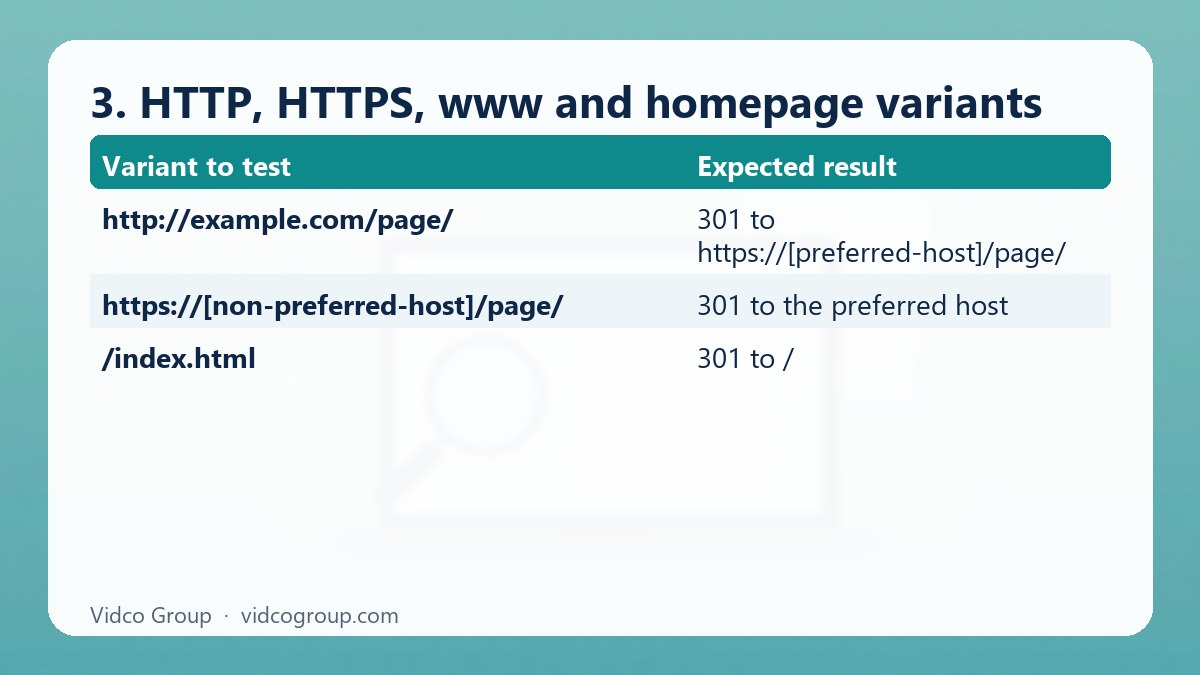
Google automatically favours HTTPS over HTTP when canonicalising, but relying on that is weaker than stating the preference yourself. Redirect all variants to one HTTPS host in a single hop, set the HTTP Strict Transport Security header only after you are certain HTTPS works everywhere, and confirm that internal links use the final form. Test both hostnames in Search Console so you see how each is treated.
| Variant to test | Expected result |
|---|---|
http://example.com/page/ |
301 to https://[preferred-host]/page/ |
http://www.example.com/page/ |
301 to the same final URL, not a second hop |
https://[non-preferred-host]/page/ |
301 to the preferred host |
/index.html |
301 to / |
4. Session IDs in crawlable URLs
URL-based sessions look like /cart;jsessionid=ABC123 or /page?sid=ABC123. If anonymous visitors get a new identifier on every visit, a crawler can discover an effectively unlimited set of URLs with identical content. Google advises avoiding session IDs in URLs and using cookies instead.
To test, request the same page in a clean browser, a private window and a crawler with cookies disabled. If the URL changes on each request or inside internal links, the problem is active. Search inurl:session, inurl:sid and inurl:jsessionid, but do not stop at one result.
The preferred fix for anonymous browsing is cookie-based session management with stable URLs in navigation. For existing variants, redirect to the clean URL when the session is not needed, or return 410 for obsolete URLs after confirming they have no legitimate function. Keep sessions for checkout and authentication rather than trying to make transactional URLs indexable. Review logs for 30 to 90 days after deployment; old links and caches mean requests will not drop to zero immediately. The target is a sustained reduction and no session IDs in sitemaps or internal links.
5. Infinite faceted URLs
Faceted navigation can create addresses like /laptops?brand=a&ram=32gb&color=black. Add price ranges, availability, sorting, pagination and multiple category paths, and a catalogue of 10,000 products can yield millions of combinations. Google’s documentation names two consequences: overcrawling of faceted URLs and slower discovery of new content.
Decide which facets deserve landing pages
| Question | If yes | If no |
|---|---|---|
| Do people search for this combination (for example “black 32GB laptops”)? | Candidate for an indexable page with clean URL and unique copy | Treat as a browsing state only |
| Is inventory stable enough to avoid constant empty pages? | Keep indexable | Do not index; return 404 for empty combinations |
| Does it have impressions or conversions in the last 90 days? | Review for value before touching | Strong candidate to canonicalise or block |
| Is it heavily linked internally? | Reduce links if the page is low value | Nothing to change |
If you do not want faceted URLs indexed, Google lists preventing crawling with robots.txt as the preferred way to save server resources, with canonical tags as a way to gradually reduce crawling of non-canonical variants. If you do need them indexed, use the standard & separator, keep the filter order consistent in the URL, and return a 404 status for combinations with no results. Do not blanket-noindex every filtered page if real category demand depends on filters; and do not make every combination indexable because “more pages means more traffic”, since thin combinations raise URL volume without creating useful results.
6. Non-ASCII encoding inconsistencies
Accents, non-Latin scripts and symbols can be displayed readably but transmitted as percent-encoded UTF-8. Google’s guidance supports using your audience’s language in URLs with proper percent-encoding. Problems occur when the CMS, CDN, redirect layer and sitemap generator encode the same path differently, producing duplicate or double-encoded versions of one address.
Use inurl:%C3 and inurl:%E2 to surface common UTF-8 byte sequences, then compare with a known non-ASCII slug. Test both forms for status code, canonical target and content. Because operators cannot reliably distinguish every encoding error, a crawl and a log sample are essential.
Choose one canonical representation and make every internal link, sitemap entry, canonical and hreflang reference point to it. Use UTF-8 consistently, avoid double encoding, and redirect legacy forms where the server can identify them safely. Keep slugs stable: changing a working multilingual slug purely to strip accents creates redirects and risks lost links.
7. Underscores, fragments and unreadable URLs
- Underscores: Google recommends hyphens over underscores to separate words because underscores traditionally join concepts together. Changing live slugs only for this reason is rarely worth the redirect cost; apply the rule to new URLs.
- Fragments: Google generally does not support URL fragments (the part after
#) for crawling and indexing. Do not use fragments to load different content that you want indexed; use real paths or the History API. - Opaque IDs: prefer readable words over long ID numbers. They help users, and they make log analysis and audits easier.
- Calendars and infinite spaces: dynamic calendars without an end date and broken relative links can generate endless URL spaces. Audit these in a crawl.
8. URLs with unnecessarily deep paths
Deep paths are not automatically harmful. A URL with five folders can rank if it is useful and well linked. The risk is operational: deep, repetitive paths often signal duplicated taxonomy, weak internal linking, redirect chains and pages many clicks from the homepage.
For a precise audit, calculate slash depth from a crawl export. Investigate URLs deeper than four or five levels, especially those with fewer than two internal links or more than three clicks from primary navigation. Fix structure only where folders are redundant. For example, replace /products/2026/catalog/department/item-name with a shorter stable path if the year and catalogue folders do not change the page’s meaning. Map each old URL to its closest equivalent with a one-hop 301, update internal links, and keep redirects for at least 12 months when backlinks or long-lived campaigns exist. Do not flatten every URL indiscriminately; shorter is not inherently better, and removing useful categories can damage breadcrumbs, analytics grouping and editorial clarity.
9. Redirect chains and wrong redirect types
Redirects are the cure for most URL problems, so mistakes in them turn the cure into a new problem.
| Mistake | Effect | Fix |
|---|---|---|
| Chain: A to B to C | Extra requests, slower crawling, possible loss of clarity about the final URL | Redirect A directly to C and update links to point at C |
| Redirect loop | Page cannot load for users or crawlers | Fix conflicting rules at server, CDN and CMS layers |
| 302 or JavaScript redirect for a permanent move | Weaker or slower signal that the move is permanent | Use server-side 301 or 308 for permanent moves |
| Redirect everything to the homepage | Poor user experience; may be treated like a soft 404 | Redirect to the closest equivalent page, or return 404 or 410 |
| Old URLs still in sitemap and internal links | Crawl waste; mixed signals | Replace with final URLs everywhere |
For changes that affect many URLs, follow the structure of Google’s site-move guidance: map old to new, implement redirects together with internal link updates, submit updated sitemaps, and monitor in Search Console. If rankings or indexing have dropped after URL changes, our diagnostic order in site not showing up on Google is a good next read.
Choosing the right fix: redirect, canonical, noindex or robots.txt
These tools are often used interchangeably, but each does a different job. Using the wrong one can hide the evidence you need or leave the duplicate in place.
| Situation | Best tool | Why | Watch out for |
|---|---|---|---|
| Duplicate page that users do not need | 301 redirect | Strongest consolidation signal; users reach the right page | Chains and loops |
| Duplicate that users must still reach (sorted list, tracked link) | rel="canonical" to the preferred URL |
Keeps the page usable and signals the preferred version | Canonicals are signals; conflicting internal links weaken them |
| Page should be reachable but never appear in search | noindex | Explicit instruction not to index | Do not use noindex as a canonicalisation workaround; Google advises against it |
| Huge parameter or facet space you never want crawled | robots.txt disallow patterns | Saves server and crawl resources | Google may still index disallowed URLs without content; blocked pages cannot pass canonical or noindex signals |
| Different canonicals sent by different methods | Align them | Google advises against contradictory signals | Check HTTP headers, HTML and sitemap together |
Two common misconceptions are worth stating plainly. First, “a canonical tag fixes every duplicate” is wrong; it is one signal among several. Second, “block it in robots.txt and the duplicate is solved” is wrong if you also need consolidation, because a blocked URL cannot be crawled to read its canonical or redirect. Choose by goal: consolidate (redirect or canonical), prevent indexing (noindex), or reduce crawling (robots.txt).
Implementation and monitoring checklist
- Export affected URLs and group them by problem type before making changes.
- Select one preferred URL per content item and document the rule in technical requirements.
- Implement redirects, canonicals, internal-link updates, sitemap changes and template fixes together where possible.
- Test at least 20 URLs per rule, including old, new, uppercase, slash, encoded, parameterised and mobile variants.
- Within 48 hours, check for redirect chains, accidental 404s, canonical conflicts and blocked resources.
- Review crawl stats and server logs weekly for the first 30 days, then monthly for three months.
- Compare organic impressions, indexed-page counts, crawl requests and conversions against the pre-change baseline.
| Metric | Where to read it | Healthy direction after the fix |
|---|---|---|
| Duplicate or alternate-page statuses | Search Console Pages report | Fewer unintended “duplicate” URLs; intended pages indexed |
| Crawl requests to parameter and facet URLs | Server logs; crawl stats | Falling share of requests to low-value URLs |
| Landing pages in analytics | Analytics | One landing URL per content item |
| Redirect status codes | Crawler; logs | Single-hop 301s, no loops |
| Impressions and clicks for priority pages | Search Console Performance | Stable or rising, not split across variants |
Most URL clean-up projects do not require a platform rebuild. Effort and cost depend on your CMS, the number of affected URLs and how much testing the change needs; application-level changes to sessions or faceted navigation take more engineering time than a redirect map. Prioritise the patterns consuming the most crawl activity or splitting your most valuable URLs, then verify the result instead of assuming a redirect file solved it. Mobile rendering and parity issues can also affect how URLs are indexed; see mobile-first indexing: what gets missed on desktop-built sites.
Frequently asked questions
What are the most common URL problems for SEO?
Duplicate URLs from parameters, uppercase and trailing-slash variants, HTTP/HTTPS and www variants, session IDs, faceted navigation, inconsistent encoding of non-ASCII characters, redirect chains and unnecessarily deep paths. Most of them come down to several addresses serving one page without a clear preferred version.
Do trailing slashes matter for SEO?
They matter when both versions return the same content with a 200 status, because search engines can treat them as separate URLs. It does not matter which convention you choose, as long as you pick one, redirect the other and keep internal links, canonicals and sitemaps consistent.
Are uppercase letters in URLs bad for SEO?
Google says URLs are case sensitive, so uppercase and lowercase paths can be different addresses. Mixed case is not penalised in itself, but it creates duplicate risk when both forms resolve. Use lowercase for new URLs and redirect legacy uppercase versions.
Should I use hyphens or underscores in URLs?
Google recommends hyphens to separate words. Apply this to new URLs. For existing working URLs, changing underscores usually is not worth the redirect effort unless you are already restructuring.
How many parameters are too many?
There is no fixed number. Google advises using as few as possible and avoiding session, referral and sorting parameters when you can. Judge by effect: if parameters create many near-identical URLs that receive crawl requests but no impressions, they are too many for that site.
Is robots.txt enough to handle duplicate URLs?
Not for consolidation. Robots.txt reduces crawling, which can be the right goal for facet spaces you never want crawled, but a blocked URL cannot be read for a canonical or redirect, and Google may still index blocked URLs without content. Use redirects or canonicals when you need signals to consolidate.
Should I change my URLs to fix these problems?
Only when the benefit outweighs the risk. Changing URLs always carries redirect and link-loss risk. Prioritise problems that duplicate indexable pages or waste significant crawl capacity, and leave stable, working, merely imperfect URLs alone.
How long do URL fixes take to show results?
Crawling and reprocessing take time that depends on site size and crawl frequency, so expect weeks rather than days for large sites. Monitor logs and Search Console for 30 days, then monthly for three months, and compare with your baseline rather than judging by a single week.
How do I find URL problems on my site?
Combine a full crawl, a Search Console Pages export, server logs and a manual test of URL variants. Search operators are useful for a first look but cannot prove what is indexed.
Conclusion and next step
URL problems are cheap to find and often expensive to ignore. Build the inventory, choose a preferred URL for every page, apply the weakest fix that works, and measure the effect. A sensible first step this week is to test 20 representative URLs in all their variants and list every one that returns 200 for more than one form.
Vidco Group can help. If you want a prioritised URL and indexation audit with an implementation specification your developers can act on, see our services and pricing, or contact the team with your domain.
Sources
- Google Search Central: URL structure best practices
- Google Search Central: How to specify a canonical URL
- Google Search Central: Managing crawling of faceted navigation URLs
- Google Search Central: Redirects and Google Search
- Google Search Central: Introduction to robots.txt
- Google Search Central: Site moves with URL changes
Updated: October 2026
Need an SEO, AEO or GEO strategy?
The Vidco Group team is ready to work with you