AI Visibility Checker — And What “AI Overview Checkers” Cannot Tell You
Type “AI overview checker” into a search engine and you will find a row of tools promising to tell you, instantly, whether your site appears in Google’s AI Overviews. Almost...
Type “AI overview checker” into a search engine and you will find a row of tools promising to tell you, instantly, whether your site appears in Google’s AI Overviews. Almost none of them can do that. This page explains what is actually checkable, gives you a real check on the surface we can query, and shows you how to verify the rest by hand.
Run the check
Five buyer-style prompts, none containing your brand name. You get the raw answers back, not just a score. Three checks per day.
What this tool measures, precisely
It sends five buyer-style prompts to a generative model through its API. None of the prompts contain your brand name — that is the whole point. If a prompt says “what do you think of Acme?”, the answer only tells you the model has heard of Acme. The useful question is whether the model brings you up when a buyer describes their problem.
| Metric | Definition | What a low score tells you |
|---|---|---|
| Mention Rate | Share of answers in which your brand name appears | The model does not associate you with the category. This is a third-party coverage problem, not an on-page one. |
| Citation Rate | Share of answers in which your domain appears as a source | Your pages are not being treated as citable. This is a content-structure and authority problem. |
| Raw answers | The full text of every response | So you can check our scoring rather than take it on trust. |
What this tool does not measure — stated plainly
It does not check Google AI Overviews. It does not check ChatGPT, Perplexity or Copilot. Those are separate surfaces with separate retrieval behaviour, and a result on one is not a result on another. Any tool that shows you a single “AI visibility score” without naming the engines behind it is averaging things that do not average.
Why an honest instant “AI Overview checker” is hard to build
| Obstacle | Why it matters |
|---|---|
| AI Overviews are not served through a public API | There is no sanctioned way to query them at scale, so tools scrape — which is fragile and against the terms of the surface they scrape. |
| They are personalised and location-dependent | The same query produces different results by country, device and history. A single check is one sample, not a fact. |
| They do not trigger on every query | Whether an Overview appears at all varies by query type and changes over time, so “not found” is ambiguous. |
| Results shift without notice | A checker that ran last month is not comparable to one that runs today unless the prompt set and method were frozen. |
None of that makes AI Overviews unmeasurable — it makes them measurable only with browser-based collection, a fixed query set, and repeated sampling. That is slow and it is not instant. We would rather say so than sell you a number we cannot defend.
How to check AI Overviews yourself, by hand
- Pick ten queries a buyer would actually type. No brand names.
- Run each in a clean browser session, with location set to your target market.
- Record three things per query: whether an AI Overview appeared, whether your brand is named in it, and which domains are linked as sources.
- Repeat the same ten queries on the same day each month. Comparability comes from not changing the test.
- Cross-check against Search Console: filter impressions by those queries and watch for impressions rising while clicks stay flat — a common signature of being summarised rather than clicked.
Ten queries checked properly once a month beats a dashboard number you cannot audit.
What to do with a 0% result
It is more common than vendors admit, and it is useful precisely because it is unambiguous. Our own first baseline scored our brand at 0% on both mention and citation, and the model named three competitors instead. The work that follows splits cleanly:
- Mention is the problem → the fix is off-site: consistent entity information everywhere you appear, presence in the listings and publications that cover your category, and coverage worth citing.
- Citation is the problem → the fix is on-site: restructure your best pages into self-contained, sourced claims with dates, tables and question-shaped headings.
- Both are zero → start with eligibility. Confirm your robots rules do not block AI crawlers and that your key pages render server-side. That check takes an hour and occasionally explains the whole result.
Related reading
- How to measure AI search visibility — the full method, reproducible by anyone.
- Why you are not appearing in AI Overviews
- How brands get cited by ChatGPT
- AI search optimisation — scope, method and pricing.
Frequently asked questions
Does this check Google AI Overviews?
No. It queries a generative model through its API. AI Overviews are a different surface that requires browser-based collection — the section above explains how to check them by hand.
Why are there only five prompts?
Because it is free and each prompt is a live model call. Five gives you a directional read. A defensible baseline needs 50 or more, which is what we run in a paid engagement.
Is a 0% result bad?
It is normal for a brand with little third-party coverage, and it is honest. Our own first measurement was 0% on both metrics.
Can I see how you score it?
Yes — the raw answers are returned with every check so you can verify the matching yourself. Brand matching is done on word boundaries with accents normalised, so a short brand name cannot match inside a longer unrelated word.
Why three checks per day?
Each check costs five model calls. The cap keeps the tool free and available. If you need more, get in touch.
Want the full baseline instead of five prompts?
We run 50–100 prompts across the engines in scope, score Mention Rate, Citation Rate and Share of Model, and hand you the competitor board plus every raw answer.
How to use an AI visibility checker result without fooling yourself
An AI visibility checker is only useful if you know what its number represents. This tool samples a generative model with five buyer-style prompts and reports how often your brand is named (Mention Rate) and how often your domain is cited (Citation Rate). It is a directional baseline for one engine, taken at one moment. The sections below explain how to read that baseline, which other AI surfaces you still need to check separately, what to fix first, and how to repeat the test so that changes mean something.
Contents
- Reading Mention Rate and Citation Rate together
- AI search surfaces and how each one is checked
- AI crawler access: what to check in robots.txt
- How to design buyer-style prompts that hold up
- Types of AI visibility tools compared
- A 30-day plan after your first check
- Mistakes that make AI visibility data misleading
- More questions about AI visibility checks
- Sources
Reading Mention Rate and Citation Rate together
The two metrics fail for different reasons, so the combination tells you where to work. With five prompts, each answer moves a score by 20 percentage points, which is why a single run should be treated as a signal, not a verdict.
| Mention Rate | Citation Rate | What it usually means | First move |
|---|---|---|---|
| Low | Low | The model does not associate your brand with the category, and your pages are not treated as sources | Check crawler access and that key pages render without JavaScript; then build third-party coverage |
| Low | Higher | Your pages are used as sources, but the answer does not name your brand | Make the brand name appear next to the claims you want attributed: author, organisation, product names |
| Higher | Low | The model knows your brand from other sites, but your own pages are not being cited | Restructure core pages into self-contained, dated, sourced claims with question-style headings |
| Higher | Higher | You are present on this engine for these prompts | Widen the prompt set and compare against named competitors before celebrating |
Always read the raw answers, not only the score. Look for three things: which competitors are named instead of you, which domains are cited as sources, and whether the model describes your category the way your buyers do. Those three observations usually produce a better to-do list than the percentage itself.
AI search surfaces and how each one is checked
There is no single “AI search”. Each surface retrieves content differently, so a result on one does not transfer to another.
| Surface | How it finds content | How to check it | Caveat |
|---|---|---|---|
| Google AI Overviews and AI Mode | Uses Google Search’s index; Google states no special markup or AI-specific files are needed beyond being indexed and snippet-eligible | Manual, browser-based sampling with a fixed query list; Search Console shows the traffic inside the normal Web search type, not as a separate report | Personalised and location-dependent; not served through a public API |
| ChatGPT search | OpenAI’s search crawler (OAI-SearchBot) surfaces sites in ChatGPT search features | Run the same prompts in a logged-out and a logged-in session; note the cited domains | Answers vary between runs; sampling needs repetition |
| Perplexity | PerplexityBot indexes pages for Perplexity search results | Run prompts and record the cited sources shown with the answer | User-triggered fetches behave differently from the crawler |
| Microsoft Copilot and Bing | Draws on Bing’s index and its own retrieval | Run prompts and record cited links; verify that Bing has indexed your key pages in Bing Webmaster Tools | Coverage depends on Bing indexing, which is not the same as Google’s |
| Model-only answers (no live search) | The model’s training knowledge | This is what the free tool above samples through an API | Reflects what the model learned, not live retrieval |
If you want a full cross-engine baseline, follow the method in how to measure AI search visibility. If you already know you are absent from Google’s answers, start with why you are not appearing in AI Overviews.
AI crawler access: what to check in robots.txt
A surprising number of zero scores trace back to one robots.txt line written years ago. Open yourdomain.com/robots.txt and check each user agent below. The purposes come from each vendor’s own documentation, which you should re-read before changing rules because they are updated.
| User agent | Operator | Purpose | Does blocking it hurt visibility? |
|---|---|---|---|
| Googlebot | Crawls for Google Search, including AI Overviews and AI Mode | Yes. Blocking it removes you from Search and its AI features | |
| Google-Extended | Controls use of crawled content for training and grounding Gemini models | No effect on Search inclusion or ranking, according to Google | |
| OAI-SearchBot | OpenAI | Surfaces sites in ChatGPT search features | Yes, for ChatGPT search results |
| GPTBot | OpenAI | Crawls content that may be used to train OpenAI foundation models | Affects training use, not ChatGPT search listing |
| ChatGPT-User | OpenAI | Fetches pages when a user asks ChatGPT or a custom GPT to; robots.txt rules may not apply | Not controlled by robots.txt in the same way |
| PerplexityBot | Perplexity | Surfaces and links sites in Perplexity search; not used for foundation-model training | Yes, for Perplexity results |
| Perplexity-User | Perplexity | Fetches pages for user-initiated requests; generally ignores robots.txt | Not controlled by robots.txt |
Two practical points. First, decide separately about training and search visibility: blocking a training crawler is a legitimate business choice, but blocking a search crawler means that engine cannot list you. Second, OpenAI states that robots.txt changes take about 24 hours to be reflected, so do not re-test the same day. Beyond robots.txt, confirm that your key pages return full text in the initial HTML response, because crawlers that do not execute JavaScript will see an empty shell.
A quick way to test this: fetch the page with a plain HTTP client, search the response for a sentence from your main content, and note whether it is present. If it is not, fixing rendering usually matters more than any content rewrite.
How to design buyer-style prompts that hold up
The five prompts in the tool above are generated for you. When you build your own set for manual checks, use these rules so that results stay comparable over time.
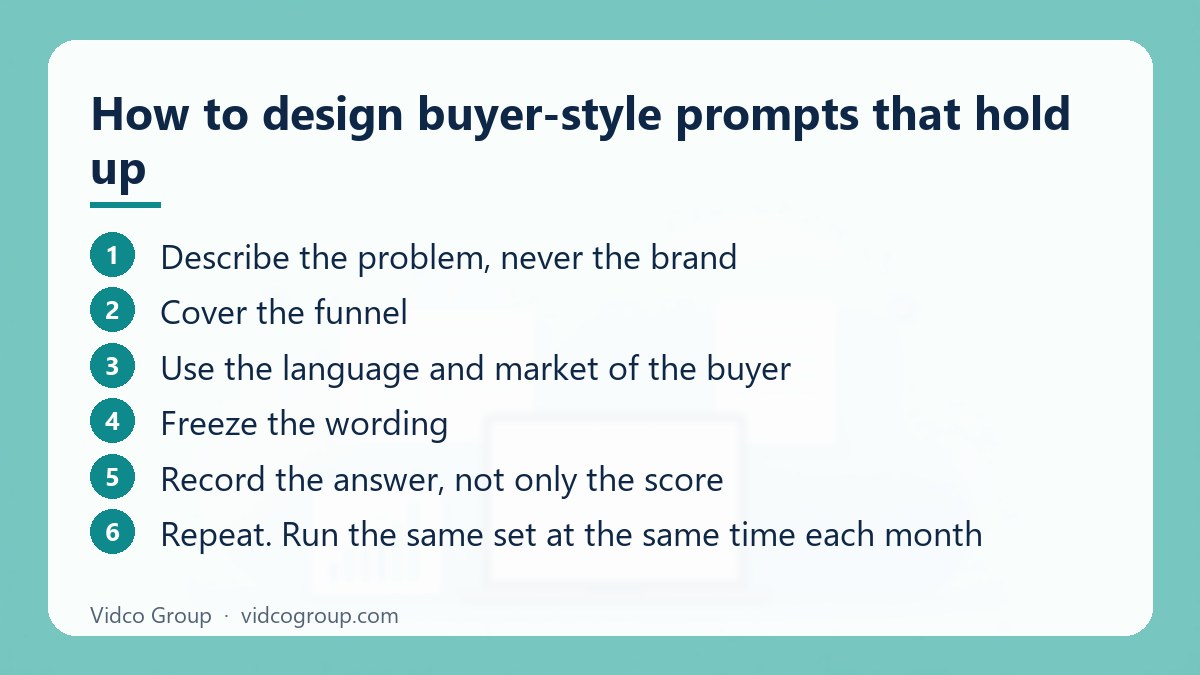
- Describe the problem, never the brand. “We need accounting software for a 10-person agency” tests whether you are recommended; “is Acme any good?” only tests whether you are known.
- Cover the funnel. Include awareness (“what is”), comparison (“best X for Y”), and decision (“X vs Z for a small team”) prompts.
- Use the language and market of the buyer. Set country, language and device to match the audience, since results differ by market.
- Freeze the wording. Changing a prompt between runs breaks the comparison. Version the list and date every run.
- Record the answer, not only the score. Save the full text and cited URLs so you can audit scoring and spot new competitors.
- Repeat. Run the same set at the same time each month; if a result matters for a decision, repeat it several times in the same week to see how much it moves.
| Prompt type | Example pattern | What it reveals |
|---|---|---|
| Problem-led | “How do I [solve problem] for [audience]?” | Whether you are associated with the problem |
| Category-led | “Best [category] for [use case] in [country]” | Whether you are on the shortlist |
| Comparison | “[Category leader] alternatives for [constraint]” | Whether you appear as an alternative |
| Trust | “Is it safe or legitimate to use [category] providers?” | Which sources shape the model’s caution |
| Local or service | “[Service] agency in [city]” | Local entity strength and directory coverage |
Types of AI visibility tools compared
When people search for an “AI overview checker” or “AI visibility checker”, they find three different kinds of product that are not interchangeable. Knowing which kind you are using prevents the most common misreading.
| Type | How it works | Good for | Limits |
|---|---|---|---|
| Prompt-sampling through model APIs (this tool) | Sends fixed prompts to a model and scores the answers | Fast, transparent baseline with raw answers | Does not reflect live retrieval on a search surface |
| Multi-engine trackers | Query several assistants and AI search features, then report mentions and competitors; typically paid at scale | Ongoing monitoring and competitor benchmarking | Method and prompt source vary by vendor; check what is actually queried |
| AI Overviews-specific checkers | Look for your domain in Google AI Overviews for a set of queries | Google-only visibility and competitor gaps | AI Overviews do not trigger on every query and vary by user and location |
| Site-readiness scorers | Inspect your own site for crawler access, structured data and similar signals | Technical hygiene checks | Estimate of readiness, not proof of being mentioned or cited |
Before trusting any score, ask four questions: which engines are queried, where do the prompts come from, are the raw answers shown, and can the run be repeated with the same inputs? If a tool cannot answer, treat its number as marketing.
A 30-day plan after your first check
| Week | Focus | Concrete tasks |
|---|---|---|
| 1 | Eligibility | Check robots.txt for the crawlers above; confirm key pages are indexable and render full text in HTML; fix canonical or noindex errors; confirm Bing indexing |
| 2 | Entity clarity | Make organisation name, description, address, founders and social profiles consistent across your site and major profiles; add an about page and named authors |
| 3 | Page structure | Rewrite 3 to 5 core pages so that each section starts with a direct answer, followed by evidence, a dated figure and a table; add visible sources |
| 4 | Third-party coverage and re-test | Identify which sources the answers cited; pursue accurate listings and coverage in those publications; re-run the same prompts and compare |
Do not expect movement in a few days. Retrieval systems update on their own schedule, and some effects take longer than a month, so judge the plan by whether the inputs improved (crawlability, clarity, sources) and whether the sampled answers trend in the right direction across repeated runs. For the on-site restructuring step, see how brands get cited by ChatGPT.
Mistakes that make AI visibility data misleading
- Averaging engines into one number. A blended score hides which surface you are missing from.
- Treating one run as a trend. Generative answers vary; a 20-point move on five prompts can be a single answer changing.
- Prompting with your brand name. It inflates mention rates and says nothing about discovery.
- Ignoring who gets cited instead. The cited competitor and third-party sites are your content and outreach brief.
- Optimising for the tool. Stuffing your brand into pages to raise a score does not help real buyers and can reduce trust.
- Assuming schema or an AI-specific file is the switch. Google says no special markup or AI text files are needed for its AI features; make pages indexable, clear and useful first.
- Blocking all AI crawlers by default, then wondering why you are absent. Separate training controls from search listing controls.
More questions about AI visibility checks
What is an AI visibility checker?
An AI visibility checker tests whether a brand or domain appears in answers from AI systems, usually by sending buyer-style prompts and recording mentions and cited sources. Different tools query different engines, so always check which ones are included before comparing scores.
How is an AI visibility checker different from an AI Overview checker?
An AI Overview checker focuses on Google’s AI Overviews for specific queries. A broader AI visibility checker may include ChatGPT, Perplexity, Copilot or model-only answers. The tool on this page samples a generative model through an API, so it is not an AI Overview checker.
How often should I run an AI visibility check?
Monthly is a sensible rhythm for most sites, using the same prompt set each time. Run an extra check after a major change such as a site migration, a large content rewrite or a robots.txt update, but wait for crawler changes to take effect first.
Will fixing robots.txt immediately improve my score?
Not immediately. OpenAI documents roughly 24 hours for robots.txt changes to apply, and models and indexes update at their own pace. Treat robots.txt as a prerequisite, not a quick win.
Does blocking GPTBot remove me from ChatGPT search?
According to OpenAI’s documentation, GPTBot relates to training use, while OAI-SearchBot controls whether sites are surfaced in ChatGPT search features. Check the current documentation before changing rules because bot roles can be updated.
Is a low score a sign my SEO is bad?
Not necessarily. A site can rank well in classic search and still have low model mention rates if few third-party sources describe it in its category. Citation and mention reflect different things from rankings, so diagnose them separately.
Can I check AI visibility for a local business?
Yes. Include the city or region in the prompts and use the matching country setting. Local results depend heavily on consistent business information and listings, so also review your directory profiles.
What should I do with the raw answers?
Create a table of which competitors were named, which domains were cited and which claims were attributed to them. Then compare those sources with your own pages to find the topics where you lack a citable, dated, evidence-backed page.
Want the full baseline instead of a five-prompt read?
Vidco Group can help. Our team runs a fixed prompt set across the engines in scope, returns every raw answer with the scoring, and turns the findings into a prioritised fix list. See AI search optimisation for the scope, or contact us with your domain and category.
Sources
- Google Search Central: AI features and your website
- OpenAI: Overview of OpenAI crawlers
- Perplexity: Perplexity crawlers
- Google Search Central: Google’s common crawlers (Google-Extended)
- Google Search Central: Introduction to robots.txt
Updated: October 2026
Need an SEO, AEO or GEO strategy?
The Vidco Group team is ready to work with you