How to Optimise a Website So ChatGPT Can Actually Use It
To optimise a website for ChatGPT, let OpenAI’s search crawler (OAI-SearchBot) reach your pages, make sure the main content is in the initial HTML, put a direct, checkable answer in...
To optimise a website for ChatGPT, let OpenAI’s search crawler (OAI-SearchBot) reach your pages, make sure the main content is in the initial HTML, put a direct, checkable answer in the first 100 words of each page, back it with clear authorship and sources, and earn mentions on other trusted sites. OpenAI does not publish a ranking checklist, and placement is never guaranteed, so treat everything below as good practice rather than a formula.
Your website might look perfect to a person and still be hard for a machine to use. Pages that rely on scripts to show their text, block crawlers by accident or bury the answer under a long introduction give ChatGPT little to quote. This guide separates what OpenAI and Google document from what is practitioner opinion, and turns it into a seven-step plan you can audit in an afternoon.
Contents
- What does it mean to optimise for ChatGPT?
- Step 1: Let the right crawlers in
- Step 2: Put the content in the initial HTML
- Step 3: Write answer-first, extractable pages
- Step 4: Show who wrote it and why to trust it
- Step 5: Use structured data and llms.txt realistically
- Step 6: Earn mentions beyond your own site
- Step 7: Measure what ChatGPT actually does
- Myths and misguided tactics
- Technical audit checklist
- Common mistakes
- When to invest and when to wait
- Frequently asked questions
What does it mean to optimise a website for ChatGPT?
ChatGPT touches websites in three different ways, and OpenAI documents a separate user agent for each. Optimising for ChatGPT mostly means deciding which of these you want to allow, then making sure the pages you want cited are reachable and easy to quote.
| User agent | What OpenAI says it is for | Controlled by robots.txt? |
|---|---|---|
| OAI-SearchBot | Surfacing websites in ChatGPT’s search features | Yes. Opted-out sites will not appear in search answers; changes take about 24 hours to apply |
| GPTBot | Crawling content that may be used to train generative AI foundation models | Yes. Disallowing signals that content should not be used for training |
| ChatGPT-User | Certain user actions in ChatGPT and Custom GPTs, such as a user asking it to visit a page | No. robots.txt rules may not apply, and it is not used to decide search eligibility |
| OAI-AdsBot | Validating the safety of pages submitted as ads on ChatGPT | No. It only visits submitted ad pages |
The practical consequence: you can block GPTBot to opt out of training while still allowing OAI-SearchBot so your pages can appear in ChatGPT search. Blocking the wrong one is the most common self-inflicted wound.
Step 1: Let the right crawlers in
Before content quality matters, the crawler must be able to fetch the page. Three checks cover almost every case.
Check robots.txt and meta robots
Open /robots.txt and confirm that OAI-SearchBot is not disallowed from the sections you want cited. A minimal policy that allows search but opts out of training looks like this:
User-agent: OAI-SearchBot
Allow: /

User-agent: GPTBot
Disallow: /
Whether to block GPTBot is a business decision, not an optimisation requirement. Also check that valuable pages carry no stray noindex directive. OpenAI notes that to keep a page out of search snippets you can use a noindex meta tag, which the crawler must be allowed to fetch in order to read. See our guide to noindex and robots directives for how the two interact.
Check your CDN and firewall
A robots.txt that says yes does not help if your CDN or web application firewall serves a challenge page to unknown bots. OpenAI’s documentation says your host or CDN must allow traffic from its published search crawler IP ranges (listed at openai.com/searchbot.json). Ask your host or security team to confirm that verified OpenAI crawlers are not rate-limited or challenged.
Check status codes and stability
Soft 404s, redirect chains, intermittent 5xx errors and very slow responses all reduce the chance that a crawler retrieves a complete page. Keep important URLs stable, return correct status codes, and keep response times and layout stability healthy.
Step 2: Put the content in the initial HTML
Many sites assemble their text in the browser with JavaScript. Google can render JavaScript, but its own documentation still recommends checking that content is available to its systems. For AI crawlers the picture is less documented: some practitioners report that several of them execute little or no JavaScript. Treat that as a risk to test, not a certainty.
- Fetch the page without a browser (for example with
curl) and read the raw response. - Check that the headline, the answer paragraph, headings, tables and the author line are all present in that raw HTML.
- If key content is missing, move to server-side rendering, static generation or pre-rendering for those templates.
- Do not hide important text behind tabs, accordions or “read more” widgets that only load after a click. If you use accordions, keep the full text in the page source.
| Symptom | Likely cause | Fix |
|---|---|---|
| Raw HTML is nearly empty | Client-side rendering | Server-side render or pre-render the template |
| Headings are styled text, not heading tags | Page builder uses divs and spans | Use real h2 and h3 elements in order |
| FAQ answers missing from source | Answers load on click | Output answers in the initial HTML |
| Table shown as an image | Screenshot instead of markup | Replace with a real table element |
| Main text buried in a huge template | Heavy navigation and boilerplate | Wrap the primary content in a main element |
Step 3: Write answer-first, extractable pages
An AI system answering a question looks for a passage it can lift with little editing. Make that easy.
- Answer in the first 100 words. State the direct answer, then elaborate. This also serves human readers who skim.
- Match headings to real questions. A heading such as “Does robots.txt control ChatGPT-User?” followed by a two-sentence answer is easier to cite than a clever heading.
- One idea per paragraph. Two to four sentences is enough. Long meandering paragraphs are harder to quote cleanly.
- Use real lists and tables for comparisons, steps and specifications. They make structure explicit.
- Define terms on the page. Do not make the reader, or the model, click elsewhere to learn what an acronym means.
- Name entities in full. Write “Google Search Console” and “Microsoft Bing Webmaster Tools”, not “the console”.
- Avoid vague pronouns. Repeat the noun when the referent would be unclear if the paragraph were quoted alone.
A self-contained section: worked example
Weak: “As mentioned above, this tool helps with that issue.” Strong: “Google Search Console’s URL Inspection tool shows whether Google has indexed a specific URL and which version of the page it fetched.” The second can be quoted anywhere without surrounding context. That is the standard to aim for on every section, while still linking to deeper pages for people who want more, such as our overview of how ChatGPT chooses sources.
Step 4: Show who wrote it and why to trust it
Models and the search systems behind them favour sources they can attribute. Google’s guidance on helpful content stresses experience, expertise and trustworthiness, and the same signals make a page safer to cite elsewhere.
- Show the author’s name, role and a short credential on the page, linking to a profile.
- Show publication and last-updated dates, and actually update the page when facts change.
- Cite primary sources (official documentation, standards, regulators) with links people can open.
- Provide a clear About page, contact details and company identity.
- Include original material that others cannot copy: your own measurements, case notes, screenshots or data, clearly labelled as yours.
- State limits. A sentence such as “OpenAI does not publish its ranking factors” builds more trust than a confident claim nobody can verify.
Step 5: Use structured data and llms.txt realistically
Structured data helps clarity, not citation by itself
Schema.org types such as Article and FAQPage describe what a page contains. They are worth adding when the markup matches visible content. But they do not replace readable text. Google’s documentation on AI features states that there is no special schema.org structured data you need to add to appear in AI Overviews or AI Mode, and no new machine-readable files or AI text files are required. Do not expect markup alone to make a page “LLM-ready”.
llms.txt is unproven
Some guides recommend publishing an llms.txt file. No major provider has confirmed it as a ranking or citation factor. If you add one, treat it as low-cost documentation, not a lever. We cover the evidence in our article on llms.txt.
| Tactic | Evidence level | Recommendation |
|---|---|---|
| Allow OAI-SearchBot | Documented by OpenAI | Do it if you want to appear in ChatGPT search |
| Correct status codes and crawlable HTML | Documented basics of search | Do it |
| Article or FAQ schema matching visible text | Clarifies content; no AI-specific benefit documented by Google | Add where honest and cheap |
| llms.txt | Not confirmed by providers | Optional; do not rely on it |
| Answer-first writing | Practitioner consensus; consistent with search quality guidance | Do it |
Step 6: Earn mentions beyond your own site
Answers in ChatGPT are shaped by what many sources say, not just what your site says about itself. Practitioner analyses report that brands mentioned on other reputable sites, with consistent business details and credible reviews, are recommended more often. This is correlation reported by marketers, not a rule published by OpenAI, so keep expectations modest.
- Keep your company name, address, services and descriptions consistent across your website, Google Business Profile and directories.
- Publish data, research or tools that other sites naturally cite.
- Contribute expert commentary to trade publications and industry sites, labelled honestly.
- Collect genuine customer reviews on recognised platforms. Never fabricate or incentivise fake ones.
- Where you pay for placement, label it as sponsored according to the platform’s rules.
For the wider approach, see our GEO checklist and our notes on how to get cited by ChatGPT.
Step 7: Measure what ChatGPT actually does
You cannot manage what you cannot see. Combine three measurements.
- Server logs. Filter requests by the user agents OAI-SearchBot, GPTBot and ChatGPT-User, and note which URLs are fetched and which return errors.
- Referral analytics. OpenAI’s publisher FAQ notes that ChatGPT adds
utm_source=chatgpt.comto referral URLs, so you can segment this traffic in tools such as Google Analytics and compare landing pages, engagement and enquiries. - Prompt sampling. Write 20 to 50 realistic questions your customers ask, run them on a schedule, and record whether your brand or pages are cited, and which competitors appear instead.
Prompt results vary between runs, accounts and locations, so look at trends across many prompts rather than single answers. Record the date, the exact prompt and the full answer so you can compare later. If you want a baseline measured for you, see our AI Visibility Audit.
| Question | Where to look | What a bad sign looks like |
|---|---|---|
| Is OpenAI fetching my pages? | Server logs for OAI-SearchBot | No requests, or many 403 and 429 responses |
| Does ChatGPT send traffic? | Analytics segment for chatgpt.com | Zero sessions despite cited pages |
| Am I cited for my target questions? | Weekly prompt sample | Competitors cited, your pages absent |
| Is the answer about me accurate? | Read the full response | Outdated prices, wrong services, mixed-up entities |
Myths and misguided tactics
| Tactic | What is actually known | Do instead |
|---|---|---|
| “Schema alone will make my content LLM-ready” | Markup describes content; it cannot make unreadable content understandable. Google says no special schema is needed for AI features | Fix access and writing first, add honest markup second |
| Keyword stuffing and repeating phrases | Hurts readability and gives a model nothing new to quote | Write natural, complete answers |
| Hiding content in tabs or click-to-load accordions | Risky: content not in the initial HTML may be missed by some crawlers | Keep full text in the page source |
| Blocking all bots “to be safe” | Disallowing OAI-SearchBot removes you from ChatGPT search answers | Block only what you intend to, such as GPTBot |
| Buying fake reviews or planted mentions | Violates platform rules and damages trust if discovered | Earn real coverage and reviews |
| Creating many thin pages for every prompt | Dilutes quality and invites spam treatment by search engines | Build fewer, more complete pages |
| Over-engineering internal links for models | Clear descriptive links help people; no evidence of AI-specific gain | Link where a reader would genuinely want to go next |
Technical audit checklist
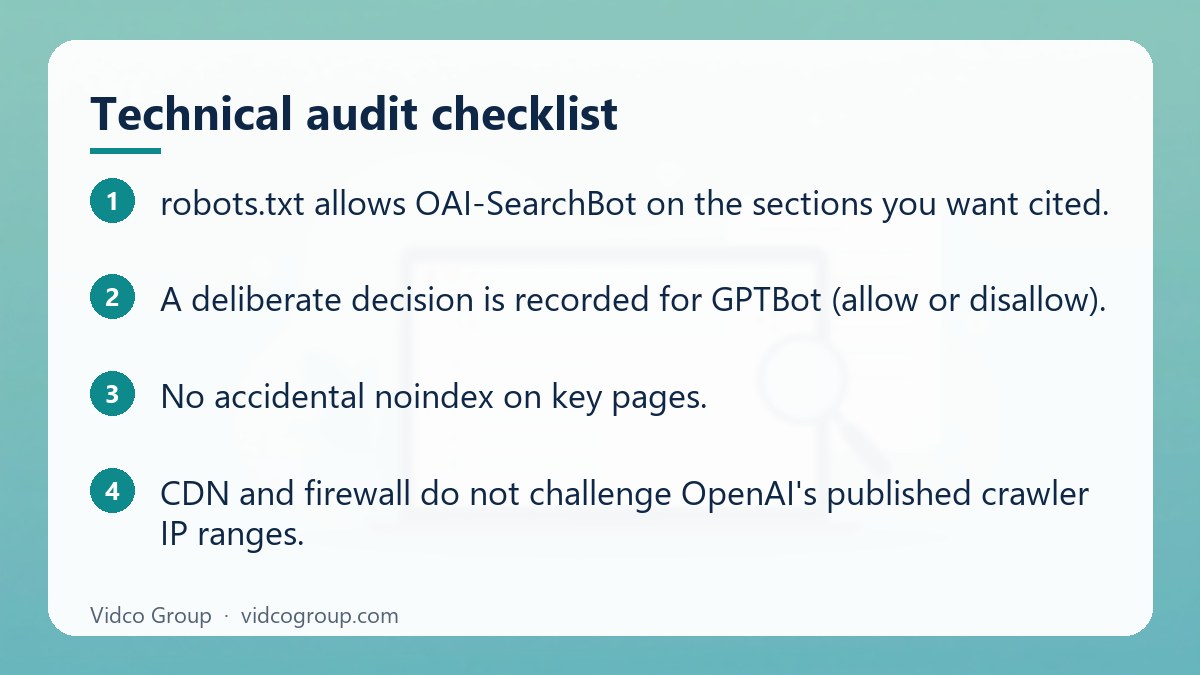
- robots.txt allows OAI-SearchBot on the sections you want cited.
- A deliberate decision is recorded for GPTBot (allow or disallow).
- No accidental noindex on key pages.
- CDN and firewall do not challenge OpenAI’s published crawler IP ranges.
- Raw HTML contains the headline, answer paragraph, headings, tables and author line.
- Important pages return 200, load reliably, and have stable URLs and canonical tags.
- Headings use real h2 and h3 elements in a logical order.
- Each page answers its main question in the first 100 words.
- Author, date, last-updated date and sources are visible.
- Structured data, if used, matches visible content and validates.
- Analytics segment for chatgpt.com referrals exists.
- A repeatable prompt sample is running monthly or weekly.
Common mistakes
- Treating all OpenAI bots as one. Blocking GPTBot does not block OAI-SearchBot, and the reverse also holds.
- Assuming ChatGPT-User obeys robots.txt. OpenAI says robots.txt rules may not apply to user-initiated visits.
- Burying the answer. Three paragraphs of context before the first useful sentence.
- Letting the CDN block bots while the robots.txt says allow.
- Chasing a single prompt. Answers vary; measure a set.
- Publishing unverifiable claims. Numbers without sources are easy to discount or contradict.
- Ignoring Bing and Google. Good performance in conventional search still supports discovery and credibility.
When to invest and when to wait
| Invest now if | Wait or keep it light if |
|---|---|
| Your customers research with AI assistants before buying | Your audience rarely uses AI tools for this decision |
| You have genuine expertise and original material to publish | You only have generic content that duplicates others |
| Your site is technically healthy and indexed | Basic crawl and index problems are unresolved |
| You can track referrals and sample prompts | You cannot yet measure anything |
If crawl and index basics are broken, fix those first. ChatGPT optimisation sits on top of ordinary search fundamentals; it does not replace them.
Frequently asked questions
How do I optimise my website for ChatGPT?
Allow OAI-SearchBot in robots.txt, make sure your CDN does not block it, put the main content in the initial HTML, answer each page’s main question in the first 100 words, show authorship and sources, and earn mentions on other reputable sites. Then measure with server logs, referral analytics and prompt sampling.
Does OpenAI publish ChatGPT ranking factors?
No. OpenAI states that placement in ChatGPT search is not guaranteed and does not publish the factors it uses. Anyone selling a guaranteed ranking formula is overstating what is known.
Should I block GPTBot?
That is a business decision. GPTBot relates to training data; OAI-SearchBot relates to search results. You can disallow GPTBot while allowing OAI-SearchBot so your pages can still appear in ChatGPT search.
Does ChatGPT-User follow robots.txt?
OpenAI says robots.txt rules may not apply to ChatGPT-User, because it fetches pages on behalf of a user action. It is not used to decide search eligibility.
Do I need special schema or an llms.txt file?
No. Google states no special schema or AI text file is required for AI Overviews and AI Mode, and no major provider has confirmed llms.txt as a factor. Structured data is still useful for clarity when it matches visible content.
Does JavaScript-rendered content hurt visibility in ChatGPT?
It can be a risk. Practitioners report that some AI crawlers execute little JavaScript, and OpenAI does not document its rendering behaviour. The safe approach is to make sure key content is present in the raw HTML response.
How can I tell if ChatGPT is sending traffic to my site?
Check your analytics for sessions with the source chatgpt.com. OpenAI’s publisher FAQ notes that ChatGPT adds utm_source=chatgpt.com to referral URLs. Also check your server logs for OAI-SearchBot requests.
How long until changes show up?
OpenAI notes that robots.txt updates take about 24 hours to be reflected. Content and citation changes depend on re-crawling and on the many factors OpenAI does not publish, so measure over weeks, not days.
Conclusion and next steps
Optimising for ChatGPT is mostly disciplined fundamentals: allow the right crawlers, serve readable HTML, answer first, show who stands behind the page, and earn credible mentions. Nothing here guarantees a citation. Start this week by checking robots.txt for OAI-SearchBot, fetching your top five pages as raw HTML, and rewriting each page’s opening to answer its main question in under 100 words.
Sources
- OpenAI: Overview of OpenAI crawlers (OAI-SearchBot, GPTBot, ChatGPT-User)
- OpenAI Help Center: Publishers and Developers FAQ
- Google Search Central: AI features and your website
- Google Search Central: JavaScript SEO basics
- Google Search Central: Creating helpful, reliable, people-first content
- Schema.org: Article
Updated: October 2026. Crawler behaviour and documentation change; check the original sources before acting.
How Vidco Group can help
Vidco Group audits crawler access, rendering, content structure and AI citations for your key pages, and sends back the raw answers alongside the findings so you can check our working. See our ChatGPT optimisation service or request an AI Visibility Audit.
Need an SEO, AEO or GEO strategy?
The Vidco Group team is ready to work with you